 Isle
IsleIsle Features
Isle features: a file shelf with AirDrop, screenshots and a Pomodoro timer in your notch
Isle is a macOS 26 app that turns your MacBook notch into an island. Here is everything it does, module by module. Every module can be turned on or off in Settings, so the island only shows what you use.
A file shelf with AirDrop in the notch
Drag files to the top of the screen and drop them on the notch. Two zones open: Drop to keep puts them on the Shelf, and AirDrop sends them.
- The Shelf keeps a copy of each file for seven days, so you can drop something now and pick it up later.
- Mark several items and send them all by AirDrop at once, or share them. AirDrop needs Wi-Fi and Bluetooth turned on.
- Drag an item out of the Shelf to drop it into any app, or open it.
- Images can be converted to JPG or PNG, made smaller, or have their background removed, right from the Shelf.
- Screenshots from Capture can go straight to the Shelf.
- Nothing is deleted outright: what leaves the Shelf goes to the Trash.
Screenshot capture and annotation (⌥⇧4)
Press Option+Shift+4, or use Capture in the hub. The screen freezes, you pick an area, and the annotation tools are right there, next to it.
- Mark it up with a pen, arrows, shapes, text and numbered counters.
- Hide passwords and personal data with a secure pixelate.
- Pick any color from the screen with the eyedropper.
- Press Return to copy, ⌘S to save, Esc to leave. You can also pin the capture on the screen or send it to the Shelf.
- Need a menu open in the shot? Capture can wait a few seconds before it freezes the screen.
- Upload to Imgur only when you ask, and copy the link. The image is public to anyone with the link, and you can delete it from Imgur later.
Pomodoro timer, stopwatch and countdown in the notch
Four ways to keep time, one click from the notch. The time stays beside the notch while it runs, so you see it without opening anything.
- Timer: start 5, 15 or 25 minutes with one click, and repeat the last one when it ends.
- Pomodoro: 25 minutes of focus and 5 of rest, alternating, with the round number beside the time. Islet tells you when it’s time for a break and when it’s time to focus again.
- Stopwatch: start, pause, resume and reset.
- Countdown: name an event and the island counts the days left, like “Trip in 12 days”.
While the focus timer runs, Islet looks focused with you.
A music player in your MacBook notch
Isle puts artwork, a scrubber and playback controls for Apple Music, Spotify, YouTube Music and podcasts in the notch. It works with whatever is in the system’s Now Playing, and Islet listens along. Isle can also show song lyrics.
AI usage limits and sessions
Rings in the notch show how much of each usage limit is left for Claude Code, Codex, Cursor, Gemini, GitHub Copilot and more than 20 other AI services. Isle also shows the request and the step a session is on, and when a session is waiting for you, you can answer from the island. Read how the AI module works.
The hub: hover the middle of the notch
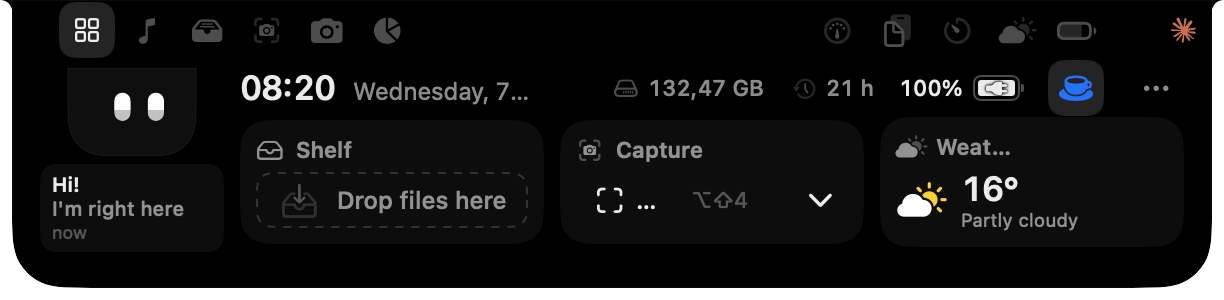
The clock, the Shelf, Capture and the weather, with a tab for every module you turn on. Move the mouse away and it tucks back into the notch.
More modules
Turn on only what you want. Each of these lives in its own tab of the island.
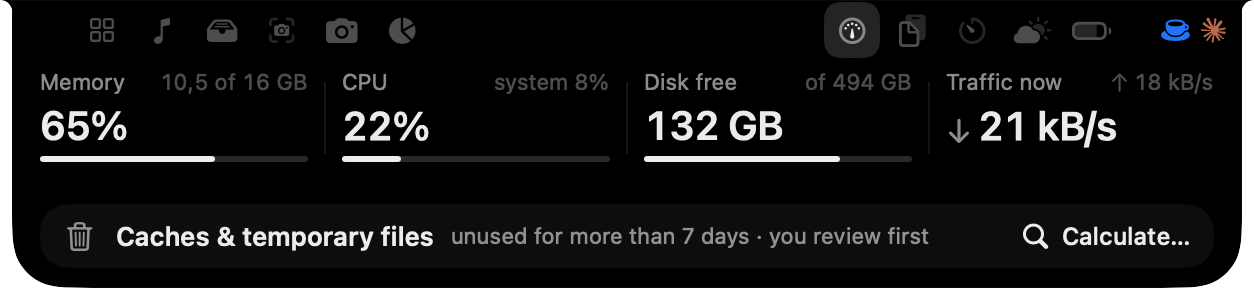
System monitor: memory, CPU, disk
Memory, CPU, free disk and network, read only while the panel is open. Clean up old caches in two steps: first a list with sizes, then they go to the Trash.
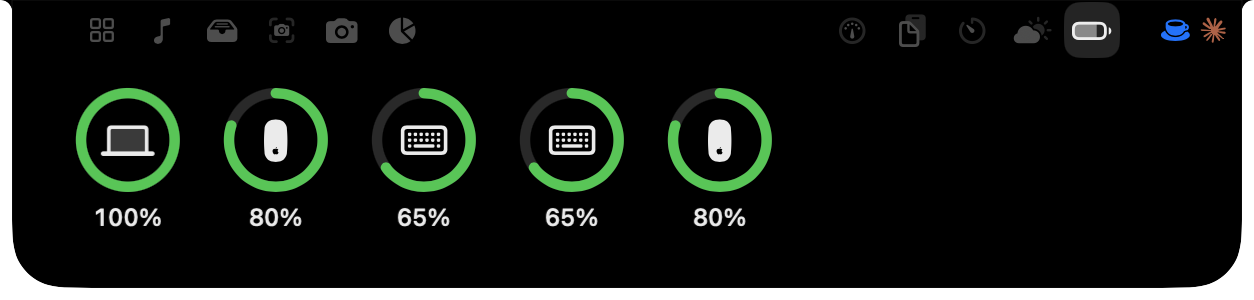
Battery of your mouse, keyboard and AirPods
The battery of your keyboard, mouse, trackpad and headphones, read by macOS itself.
Volume and brightness HUD
Volume, brightness, Caps Lock, battery and headphones, drawn right in the notch.
Mirror before a call
Check yourself before a call. The camera turns on only while the mirror is open.
Clipboard history (last 20 items)
The last 20 things you copied. Passwords are left out.
Next meeting with a Join button
Your next meeting, with a Join button for Zoom, Meet, Teams, FaceTime or Webex, plus today’s reminders.
Ask Claude Code from the notch
Ask Claude Code a quick question from the island. It runs the claude already on your Mac, and keeps the session history.
Weather with a rain heads-up
Now, the next hours, and a heads-up before it rains.
Notepad that saves itself
A notepad in the notch that saves itself.
Call timer and mute button
How long you’ve been on a call, and a button to mute your mic.
Calculator, unit converter, translation
Math, unit conversions and translation, in one field.
Run Apple Shortcuts
Run your Shortcuts from the island with one click.
External displays and Macs without a notch
Without a notch, Islet waits in a small pill at the top of the screen, the height of the menu bar. Hover it and the whole island appears. On a MacBook, everything lives in the notch.
Try Isle free for 3 days
Every feature works for 3 days, no account needed. Then US$ 14.99 once, for up to 3 Macs. Requires macOS 26.